
Location Rules
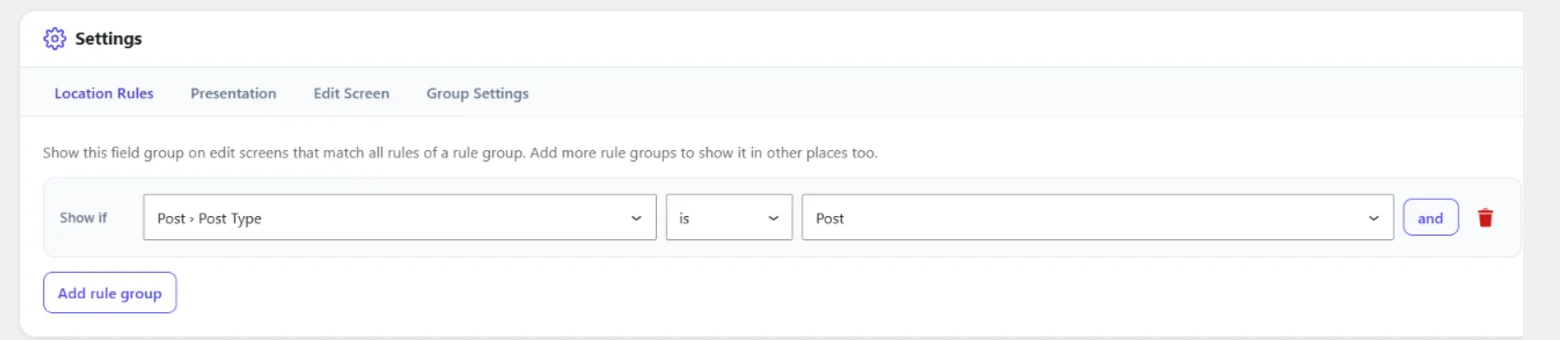
Location rules decide on which edit screens a field group appears.
Show if   Post Type  is      Page
and       Page Type  is not  Front Page
or
Show if   Taxonomy   is      Category
- Rules in one group must all match ("and").
- The field group appears when any group matches ("or").
- A field group without rules appears nowhere (the builder warns you).
- Only active groups are shown. Inactive and trashed groups never are.
Core rules
| Rule | Name | Matches on | Values |
|---|---|---|---|
| Post Type | post_type |
post edit screens | every post type with an admin UI |
| Post | post |
post edit screens | a specific post or page |
| Page Template | page_template |
post edit screens | Default Template and the theme's templates |
| Page Type | page_type |
page edit screens | Front Page, Posts Page, Top Level Page, Parent Page, Child Page |
| Post Category / Term | post_term |
post edit screens | any term; matches when the post has it |
| Taxonomy | taxonomy |
term add/edit screens | every taxonomy with an admin UI |
| Settings Page | settings_page |
Settings Pages | every Settings Page (admin and PHP) |
| User Role | user_role |
Add New User, Edit User, Profile | Any role (all) and every role of the site |
| User Screen | user_screen |
Add New User, Edit User, Profile | Add and edit (all), Add New User (new), Edit user and profile (edit) |
Each rule supports is (==) and is not (!=). Post rules never match term
screens, term rules never match post screens, the Settings Page rule only
matches Settings Pages, and the user rules only match user screens, whatever the operator.
User screens
A group with a user rule appears as a section of the WordPress user form: on Users → Add New, Users → Edit and on Profile (your own): below the WordPress fields, in the same table layout. Values belong to the user:
cafe_get_field( 'desk', $user_id, 'user' );
cafe_update_field( 'desk', 'Front desk', $user_id, 'user' );
// Editors, on their profile and when an administrator edits them.
'location_rules' => [
	[ [ 'rule' => 'user_role', 'operator' => '==', 'value' => 'editor' ] ],
],
- Saving needs the CAFE nonce and the
edit_usercapability for that user (users can edit their own profile; administrators can edit others). Only the user whose form was posted gets the values, and only the fields of groups shown for that user. - Add New User: the form does not know the chosen role yet, so it shows the groups of the site's default role (Settings → General → New User Default Role). When the user is created, only the fields of groups that match the role the user really got are saved.
- Sign-ups and users created by code never take CAFE values from a form.
- A value that does not pass its field's validation is not saved; the message is shown at the top of the screen WordPress returns to. The other fields are saved.
- On multisite, the Add Existing User form shows no CAFE fields (the user already exists).
Stored format (the same in the builder, the REST API and PHP):
'location_rules' => [
	[ // group 1: all must match
		[ 'rule' => 'post_type', 'operator' => '==', 'value' => 'page' ],
		[ 'rule' => 'page_type', 'operator' => '!=', 'value' => 'front_page' ],
	],
	[ // group 2: or this
		[ 'rule' => 'taxonomy', 'operator' => '==', 'value' => 'category' ],
	],
],
Custom rules
Add a rule with the cafe_location_rules filter.
Implement Cybo\AdvancedFieldEngine\Location\LocationRuleInterface; the builder lists your rule and its
choices automatically.
use Cybo\AdvancedFieldEngine\Location\LocationContext;
use Cybo\AdvancedFieldEngine\Location\LocationRuleInterface;

final class My_Post_Status_Rule implements LocationRuleInterface {

	public function get_name(): string {
		return 'post_status'; // Lowercase letters, digits, underscores.
	}

	public function get_label(): string {
		return __( 'Post Status', 'my-plugin' );
	}

	public function get_category(): string {
		return __( 'Post', 'my-plugin' );
	}

	public function get_choices(): array {
		return get_post_statuses(); // value => label
	}

	public function matches( LocationContext $context, string $operator, string $value ): bool {
		if ( LocationContext::SCREEN_POST !== $context->screen ) {
			return false; // Never match screens the rule is not about.
		}

		$is = $context->object_id > 0 && get_post_status( $context->object_id ) === $value;

		return '!=' === $operator ? ! $is : $is;
	}
}

add_filter( 'cafe_location_rules', function ( array $rules ) {
	$rules['post_status'] = new My_Post_Status_Rule();
	return $rules;
} );
LocationContext gives you screen (post or term), object_id (0 for new
objects), post_type, page_template, parent_id, taxonomy and term_ids.
Rules registered under the wrong key, with an invalid name or of the wrong class are ignored. Unknown rules saved in a group never match, so removing a custom rule hides those groups instead of showing them everywhere.