
ACF → CAFE
CAFE → Migration → ACF → CAFE converts this site from Advanced Custom Fields (ACF, ACF PRO or Secure Custom Fields) to CAFE. It is a conversion of the site's fields, not a content migration:
- every value stays on its own object: ACF on post 125 becomes CAFE on post 125;
- no post, page, custom post type item, media item, term or user is created, changed or deleted;
- ACF data stays untouched until you remove it yourself, at the very end, after every check passed.
ACF ── 1. convert ──▶ CAFE ── 2. verify ──▶ everything identical?
                                            ├─ no  → ACF stays untouched, fix and verify again
                                            └─ yes → 3. you confirm → remove ACF data
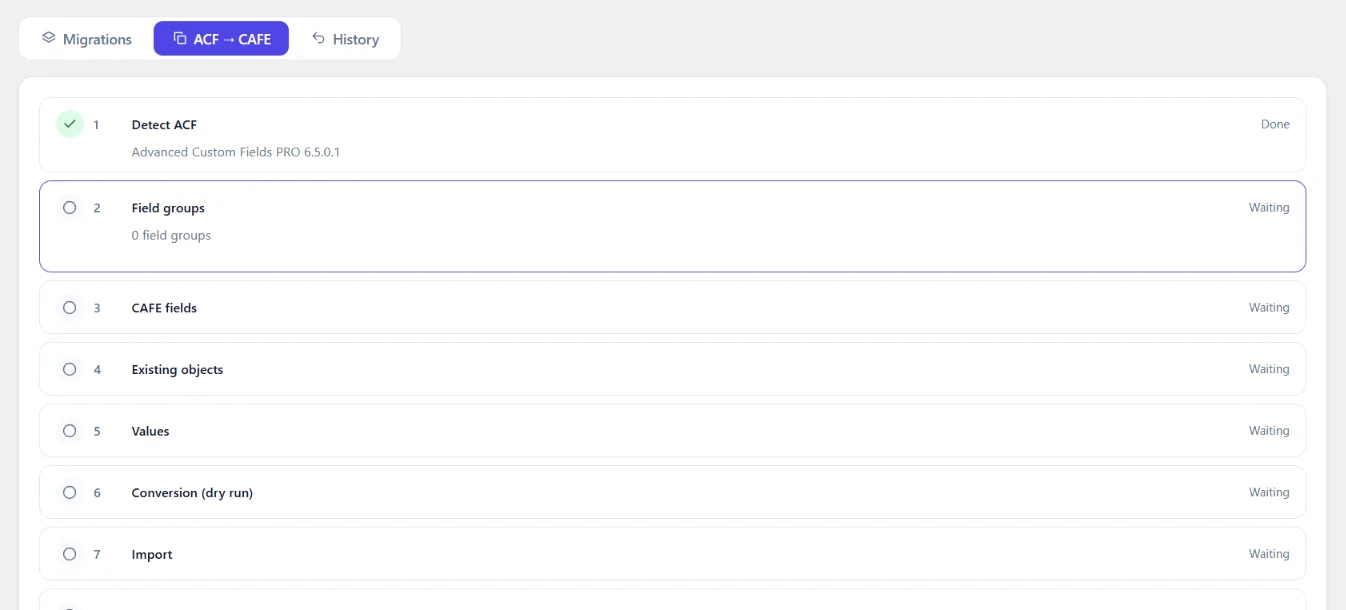
The eleven steps
Each step shows its real status. The server works it out from facts (the runs, the verification report, the code scan) and sends it with every response; the screen only adds the spinner while you wait for an action.
| Status (screen) | status (REST) |
Means |
|---|---|---|
| Waiting | pending |
Not done yet |
| Running | running |
Working: long steps show a progress bar (dry run, import, verification, removal) |
| Done | done |
Finished and still valid |
| Needs attention | warning |
Finished, but look at it: unsupported fields (3), ACF code left (9), verification older than the last import or not covering every object step 4 found (8), final verification expired (10), ACF data restored (11) |
| Failed | failed |
ACF missing (1), fields missing (3), invalid values (6, 7), mismatches (8), final check failed (10) |
| Locked | locked |
Step 11 until the final verification passed |
| # | Step (key) |
Button | What happens | Writes |
|---|---|---|---|---|
| 1 | Detect ACF (detect) |
- | ACF (or Secure Custom Fields) must be active; name and version are shown. Without it nothing starts. | - |
| 2 | Field groups (groups) |
- | The ACF field groups, through ACF's API (including groups from PHP and JSON files). | - |
| 3 | CAFE fields (fields) |
Check, Create CAFE fields | Check is a dry run. When CAFE refuses a field group, nothing is created and the step shows Failed with CAFE's reason per group. Every supported ACF field becomes the CAFE field with the same key, through CAFE's field group importer. Running it again changes nothing. | CAFE field groups |
| 4 | Existing objects (objects) |
Find objects | Counts the posts (all types, including media), terms, users and options pages that hold ACF values, and prepares one migration per kind. | Migration settings |
| 5 | Values (values) |
Dry run | Reads and converts every value, writing nothing. | - |
| 6 | Conversion (dry run) (conversion) |
- | The dry run's result: how many objects, how many invalid. | - |
| 7 | Import (import) |
Import values | Writes the values to the CAFE fields of the same objects, in batches, each object in one transaction. Can be rolled back in History. | CAFE values |
| 8 | Verification (verification) |
Verify | Compares ACF and CAFE: every field (key, name, type) and every value on every object. | - |
| 9 | Frontend code (code) |
Scan code, I checked the remaining code by hand | Scans the theme and chosen plugins for ACF calls and shows each change to make (safe, to check, by hand). CAFE never edits theme or plugin files: make the changes in your code editor, scan again, then confirm. | Nothing (read-only scan) |
| 10 | Final verification (final) |
Run the final verification | Checks every condition again. | - |
| 11 | Remove ACF data (cleanup) |
Remove ACF data | Only visible when step 10 passed (less than an hour ago). Confirmation dialog, type REMOVE ACF. |
Removes ACF data (after a backup) |
Fields
| ACF | CAFE |
|---|---|
| Text, Text Area, Number, Range, Email, URL, Password | same types |
| WYSIWYG | Rich Text |
| oEmbed, Image, File, Gallery, Link, Google Map | same types |
| Select, Checkbox, Radio Button, Button Group | same types |
| True / False | Toggle |
| Date Picker, Date Time Picker, Time Picker | Date, Date and Time, Time (return format kept when CAFE accepts it) |
| Color Picker | Color |
| Post Object, Page Link, Relationship, Taxonomy, User | same types |
| Message, Tab | same types |
| Accordion | Collapsible Section (the fields after it are placed inside it) |
| Group | Field Set |
| Repeater | Collection |
| Flexible Content | Section Builder, one Section per layout |
| Clone | Clone (same field and group keys) |
| Icon Picker and other types | not converted: reported; their ACF data is always kept |
Also carried over: required, instructions, default values, choices, widths (snapped to
CAFE's widths), conditional logic (==, !=, >, <, empty, not empty, contains;
other operators are reported), location rules (post type, post, page template, page
type, post category / taxonomy, taxonomy, options page → Settings Page, user role → User Role,
user form → User Screen: ACF's sign-up form has no CAFE screen and is reported), position,
label and instruction placement, hidden screen elements ("Hide on screen"; an element CAFE
cannot hide is left out and reported: ACF's empty value means nothing is hidden). Settings are checked
together by the CAFE field type; one CAFE does not accept is left out and reported,
never dropped silently. ACF's 0 for "no minimum / maximum" means no limit in CAFE too.
Field names CAFE does not accept (Hero-Title) become Hero_Title (reported); their
values follow automatically.
Values
ACF saves each value next to a reference: price = 450000 and _price =
field_abc. The conversion reads the values of the fields it knows, following the
reference: when two field groups use the same name, a value goes to the field it
belongs to.
| ACF stores | CAFE gets |
|---|---|
"1" / "0" |
true / false |
20260929 (date picker) |
2026-09-29 (shown in the field's return format) |
| attachment ID | the same attachment ID |
| serialized ID lists (gallery, relationship, checkbox) | lists, order kept |
team = 2, team_0_name, team_1_name (repeater) |
two Collection items |
sections = ["hero","text"], sections_0_heading (flexible content) |
two sections with _section |
address_street, address_city (group) |
one Field Set value |
| clone values (with or without name prefix) | the Clone's value |
options_company_phone (options page) |
cafe_get_option( 'company_phone' ) |
Values saved by other code. Themes and plugins often save ACF values with
update_user_meta(), update_post_meta() or update_option(): without ACF's
_name reference row. ACF still shows them (it looks the field up by name), so the
conversion finds and converts them too, for the fields of groups shown on that kind of
object only (a user role or user form location for users, a taxonomy for terms, an
options page for options, a post location for posts) and only when no other field uses
the same name. A post field is never filled from a user's meta of the same name.
Values go through CAFE's public API (FieldService::save_values()), never directly into
CAFE's tables. Empty ACF values stay empty; they never clear a CAFE value.
Values CAFE's field refuses. ACF does not check a value when it reads it, so ACF data
can hold values its own field would not accept, for example 97.450 in a yes/no radio.
CAFE does not store such a value. It is left out and reported, and the rest of that
object is still converted:
- steps 6 and 7 show Needs attention and list each left-out value: the object (linked to its edit screen), the field, why CAFE refused it and the value;
- step 8 counts them as left out, not as mismatches;
- step 11 keeps them in ACF (the only copy), so they can still be fixed: the rest of that object's ACF data is removed as usual.
To bring such a value over, fix it (in ACF, on the object's edit screen) and run steps 5-8 again. Deleting CAFE data does not change it: the value is in ACF.
Verification
Step 8 compares, for every object with ACF values:
- the ACF value, converted and sanitized by the CAFE field type (the same step saving runs), with
- the value CAFE holds for the same field on the same object ID:
row by row for Collections, section by section for Section Builders, sub-field by sub-field for Field Sets and Clones. Media IDs, related IDs and options are part of it. The report shows ACF fields, CAFE fields, objects checked, values migrated, values verified, mismatches and unsupported fields, with the object and field of every mismatch. The verification only counts when it ran after the last import.
A mismatch keeps the removal locked and ACF untouched. Typical causes: someone edited content after the import (import again), or a value CAFE's field type refuses (the dry run lists those first).
Frontend code
Step 9 scans the active theme (and its parent) and the plugins you choose, with PHP's
own tokenizer (never regular expressions) so only real function calls are found:
not method calls ($object->get_field()), text, comments or function definitions.
| Category | Example | What happens |
|---|---|---|
Safe to change (safe) |
get_field( 'price' ) on a Number field; update_field, delete_field with a plain post ID; ACF object text with a plain ID (below) |
Pre-selected; the function name becomes cafe_get_field / cafe_update_field / cafe_delete_field. Each finding shows the line as it will read |
Check before changing (review) |
get_field( 'hero' ) on an Image field (CAFE's image array has no sizes); get_field( 'x', $object ) with an object CAFE may or may not read; get_fields(); a field name that is not fixed text |
Not selected; you can approve each one after reading the reason |
Change by hand (manual) |
have_rows(), the_row(), get_sub_field(), the_field(), get_field_object(), acf_add_options_page(), acf/… hooks, function_exists( 'get_field' ), get_field( …, …, false ), ACF object text whose ID is not plain ('user_' . ( $a ? $b : $c ), 'user_' . $id . '_x', 'comment_' . $id) |
Never changed automatically; the reason says what to use instead (for rows: foreach ( cafe_rows( 'team' ) as $row )) |
ACF object text is rewritten. ACF passes users and terms as text ('user_' . $id); CAFE takes the
ID and the object type. When the ID is plain, the call is rewritten: the ID copied exactly as
written, cast to a whole number:
| ACF | CAFE |
|---|---|
get_field( 'loan_tc', 'user_' . $userID ) |
cafe_get_field( 'loan_tc', (int) $userID, 'user' ) |
get_field( 'loan_tc', 'user_' . $_POST['user_id'] ) |
cafe_get_field( 'loan_tc', (int) $_POST['user_id'], 'user' ) |
get_field( 'x', "user_{$user->ID}" ) |
cafe_get_field( 'x', (int) $user->ID, 'user' ) |
get_field( 'x', 'term_' . $term_id ) |
cafe_get_field( 'x', (int) $term_id, 'term' ) |
get_field( 'x', 'category_12' ) (any registered taxonomy) |
cafe_get_field( 'x', 12, 'term' ) |
update_field( 'x', $v, 'user_' . $id ), delete_field( 'x', 'user_' . $id ) |
the same with (int) $id, 'user' |
Plain IDs: a variable with fixed steps ($userID, $_POST['user_id'], $data['user_id'],
$user->ID), a number, get_current_user_id() or get_queried_object_id(). The prefix must be
user, term or a registered taxonomy, the object must be the call's last argument, and nothing
may follow the ID; anything else stays Change by hand. The rewrite reads PHP's tokens, never
regular expressions.
Applying changes:
- only files of the scanned theme / plugins, only
.php, only if the file did not change since the scan; - a copy of each file is saved in
wp-content/uploads/cafe-backups/code-…/first; - only the function name changes: arguments are never rewritten;
- the new code must pass PHP's parser, otherwise the file is left as it was;
- the result lists changed and skipped files, and Restore puts a backup back.
When the site forbids file editing (DISALLOW_FILE_EDIT, DISALLOW_FILE_MODS) or the
user may not edit themes and plugins, the screen only previews. The step is complete
when no ACF usage is left, or when you confirm that the remaining code was checked by
hand.
Output differences to check in templates (CAFE's own shapes, not migration errors):
- an image returned as an array has no
sizeskey: usewp_get_attachment_image()with the ID; - an empty image inside a row is
null(ACF:false); - a Field Set (ACF group) that was never saved returns an array of empty sub-values,
not
null: test a sub-value (if ( $address['street'] )), not the array; - a Toggle that was never saved returns
false(ACF:null); - an empty File inside a Field Set is
null(ACF:false); - text is cleaned the way CAFE saves it: spaces at the end of a Text field are removed,
and Windows line breaks (
\r\n) in a Text Area become\n. The verification compares after this clean-up, so these count as identical: the text itself does not change.
Final verification and removing ACF data
Step 10 checks, on the server (the list the screen shows, gate.conditions in REST):
key |
Condition |
|---|---|
acf |
ACF detected |
fields |
CAFE fields created for every supported ACF field |
values |
Values imported without failures |
ids |
Existing object IDs kept (nothing created) |
verification |
Verification passed after the last import |
code |
Frontend code migrated or checked by hand |
final |
Final verification passed (less than an hour ago) |
Only when all hold (gate.passed) does
Remove ACF data appear. The dialog explains what is removed and what is kept and
needs REMOVE ACF typed. The server checks the gate and the text again.
Removed:
- per object, the ACF rows whose reference points at a migrated field
(
_price=field_abc) and the value rows they describe (price,team_0_name…); - ACF field groups stored in the database whose fields all exist in CAFE.
Kept:
- all CAFE fields and values;
- posts, pages, custom post types, media, users, taxonomy terms, WordPress data;
- ACF values of unsupported fields, and field groups that contain them;
- field groups registered in PHP or JSON files (remove them from the code);
- meta of other plugins;
- values CAFE could not take (see Values CAFE's field refuses above);
- values that were saved without an ACF reference row (by other code, which may still
read them with
get_user_meta()and the like): they were converted and verified, but are left in place: the result says how many objects keep such values. They do not keep the field groups from being removed; - any object whose values differ from CAFE at the moment of removal: each object is verified again right before its ACF rows are removed.
Before anything is removed, every row is written to a backup file in
wp-content/uploads/cafe-backups/ (closed to the web on Apache; the name is
unguessable). Restore ACF data from the backup puts every removed row and field
group back exactly. CAFE's own rollback does not cover this step: it only undoes CAFE
imports.
Deactivate ACF only after the removal and after checking the site.
Options pages → Settings Pages
ACF PRO registers its options pages in code (admin.php?page=site-options). Step 3
creates a CAFE Settings Page with the same slug for each of them: title, menu
title, parent menu, icon, position, save button label and who may edit it, so the
converted field groups point at a real page and old links keep working.
| ACF | CAFE Settings Page |
|---|---|
menu_slug |
slug (the same address) |
page_title, menu_title |
title, menu title |
parent_slug |
parent menu: another options page or a WordPress menu CAFE offers; otherwise its own menu (reported) |
icon_url (dashicons), position |
icon, position |
update_button |
save button label |
capability |
the same, or the nearest stricter one CAFE offers (edit_posts → publish_posts); never a looser one (reported) |
Until step 11 ACF shows its own page at that address, so the CAFE pages are created
switched off. As soon as step 11 removed the ACF data, the CAFE pages take over the
address, even while ACF is still active: ACF no longer adds its (now empty) copies of
those pages (CAFE removes them from ACF's acf/get_options_pages list; ACF's other options
pages are not touched), and the CAFE pages switch on with the converted fields and values.
Restoring the ACF data gives the addresses back to ACF and switches the CAFE pages off. Pages that already exist in CAFE are left as they are;
a slug CAFE cannot use (upper case, underscores, cafe-…) is reported and not created.
Running step 3 again creates nothing new.
Rolling back
- An import (step 7) is rolled back in History (latest import per kind of object).
- Code changes: Restore in step 9.
- Removed ACF data: Restore ACF data from the backup in step 11.
- Start over forgets the screen's progress only; it never touches ACF or CAFE data.
Also possible
In the migration editor, From ACF opens these steps. The ACF source itself stays
available to developers for special cases: field groups from an ACF export file,
or values of one post type only: through the REST API and wp cafe migration; the
migrations the steps prepare can also be opened in the editor. The same
rule applies there: the ACF source only updates the same objects (update only, same
object, CAFE fields only) and is refused otherwise.
Tested with
Secure Custom Fields 6.9.5 (the WordPress.org release of ACF) on WordPress 7.1.2: 28/28
fields, 22 values on a post, a page, a custom post type item, a term, a user and an
options page (repeater, flexible content, group, clone, image, gallery, relationship,
taxonomy, user, date, true/false, select, number), get_field() and cafe_get_field()
identical, code scan and apply, removal and restore.